
AMT Bid/Ask Imbalance
Counts imbalanced price levels per bar from footprint data
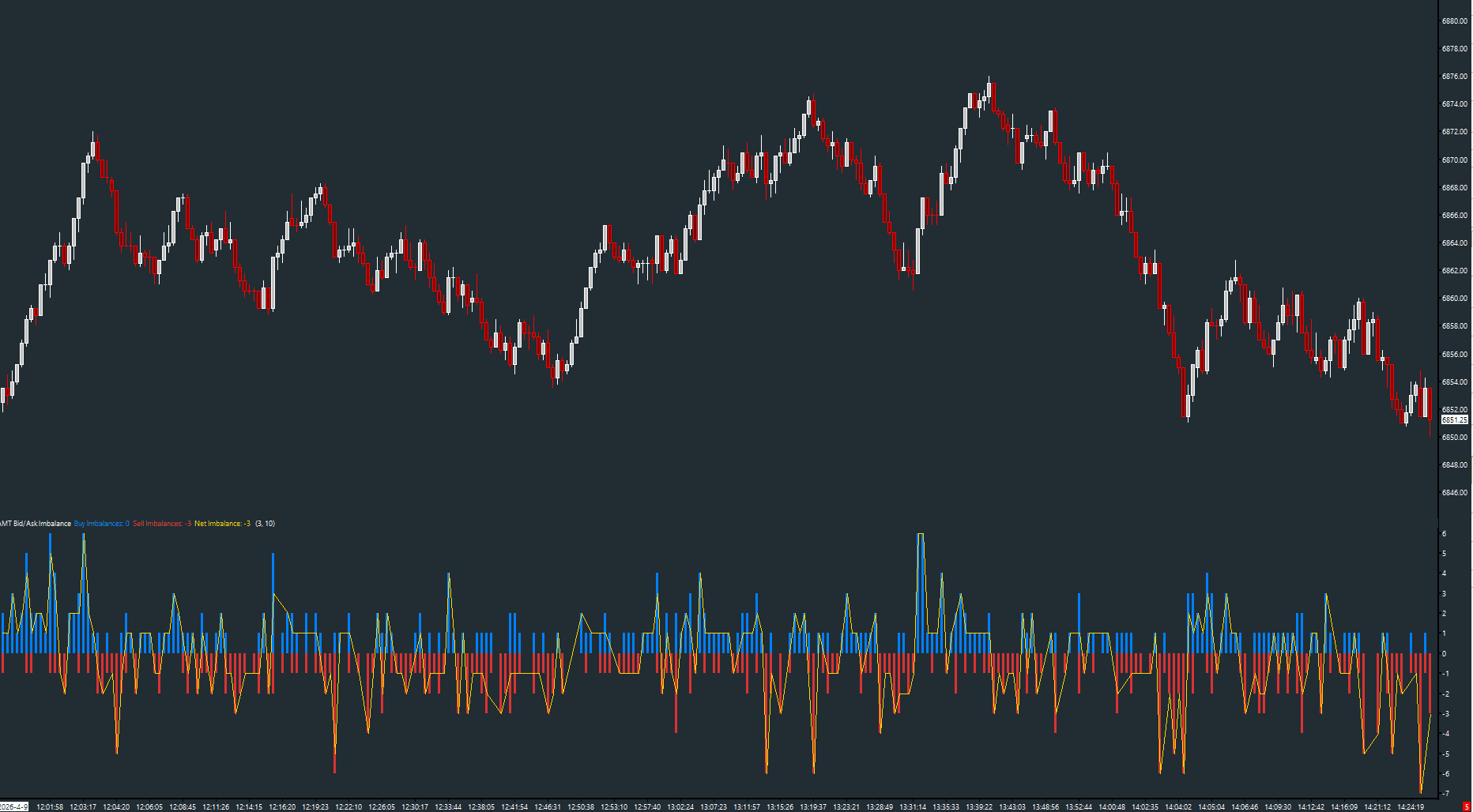
Scans each bar's volume-at-price data and counts the number of price levels where the bid/ask volume ratio exceeds a configurable threshold. High imbalance counts reveal aggressive, one-sided auction activity — the kind of conviction that moves price.
The Concept
At each price level within a bar, volume is split between the bid and ask. When one side dominates heavily, that level is considered 'imbalanced.' Multiple imbalanced levels stacking in a single bar signals strong directional conviction. This study quantifies that conviction so you can read auction strength at a glance without manually scanning every footprint row.
How to Read It
The histogram shows buy imbalances (positive, green) and sell imbalances (negative, red) per bar.
- High buy imbalance counts confirm aggressive buying — look for follow-through in price
- High sell imbalance counts confirm aggressive selling — expect price to continue lower
- The Net Imbalance line (gold) shows the directional lean of the entire bar
- Imbalance spikes at key support/resistance levels signal potential breakouts or absorption
Practical Tips
Start with the default 3.0 ratio threshold and 10 minimum volume. Lower the ratio for more signals, raise it for higher-conviction setups. This study requires 'Maintain Volume at Price Data' enabled on the chart. Best used on volume or tick-based charts where footprint data is meaningful.
Requirements
- Requires 'Maintain Volume at Price Data' enabled on the chart
Input & Settings
| No. | Input Name | Function |
|---|---|---|
| 1 | Imbalance Ratio Threshold | The minimum bid/ask volume ratio required to count a level as imbalanced. Default: 3.0. Range: 1.5–20.0. |
| 2 | Minimum Volume at Level | Minimum volume at a price level before it's evaluated for imbalance. Filters noise from low-volume levels. Default: 10. Range: 1–10000. |
The minimum bid/ask volume ratio required to count a level as imbalanced. Default: 3.0. Range: 1.5–20.0.
Minimum volume at a price level before it's evaluated for imbalance. Filters noise from low-volume levels. Default: 10. Range: 1–10000.
Subgraphs
| No. | Subgraph Name | Function & Comments |
|---|---|---|
| 1 | Buy Imbalances | Default: Bar. Count of ask-dominant levels per bar, displayed as green histogram bars. |
| 2 | Sell Imbalances | Default: Bar. Count of bid-dominant levels per bar, displayed as red histogram bars (negative values). |
| 3 | Net Imbalance | Default: Line. Net count (buy minus sell imbalances) as a gold line overlay. |
Default: Bar. Count of ask-dominant levels per bar, displayed as green histogram bars.
Default: Bar. Count of bid-dominant levels per bar, displayed as red histogram bars (negative values).
Default: Line. Net count (buy minus sell imbalances) as a gold line overlay.
Free with the AMT Toolkit
This study is part of the AMT Toolkit — a free collection of Sierra Chart studies for orderflow, market structure, and chart utilities. 100% free, with no AMT Gold membership or credit card required.
Sierra Chart and applicable market-data fees are separate.
Get the AMT Toolkit — Free