Market Pressure Index
Composite market internals gauge with VIX integration
A market internals indicator that synthesizes breadth data (TICK, NISS, NVOL, TRIN) with optional VIX-based volatility adjustment to produce a single composite pressure reading. Features three analysis modes (Balanced, Aggressive, Institutional Slow), rolling z-score normalization, regime detection, and gap analysis. Displayed in a separate chart region with fast and slow EMA lines.
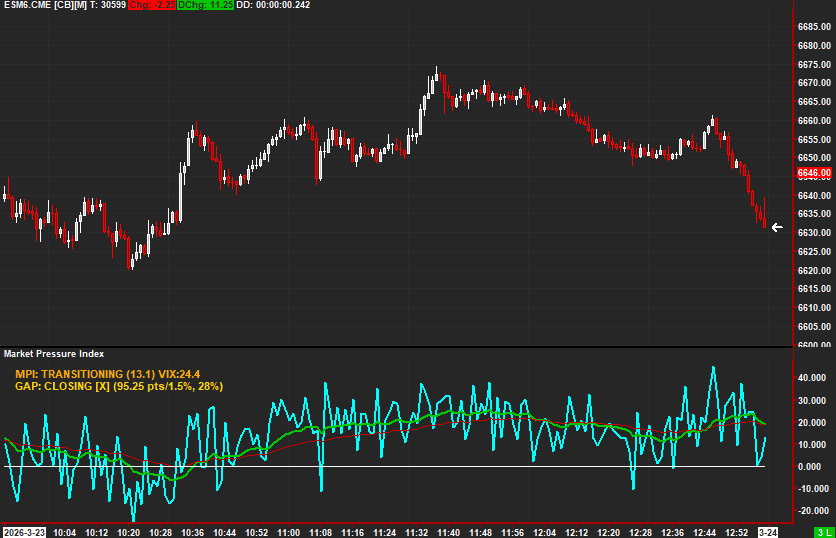
The Concept
Market Pressure Index synthesizes multiple market internals — breadth, volume, tick, and stress data — into a single composite reading of market-wide pressure. Rather than monitoring four separate data streams, MPI combines them into one normalized oscillator with regime detection, telling you whether the broad market is under bullish or bearish pressure.
How to Read It
The composite line oscillates around zero with fast and slow EMAs in a separate region.
- MPI above zero indicates net bullish market pressure — broad internals favor the upside
- MPI below zero indicates net bearish market pressure — broad internals favor the downside
- The Fast EMA crossing above the Slow EMA confirms a bullish pressure shift
- The regime text display provides a plain-language summary of current market conditions
Practical Tips
Requires TICK, NISS, NVOL, and TRIN data studies on the same chart — set up the study references carefully. Three analysis modes are available: Balanced (default), Aggressive (faster reactions), and Institutional Slow (smoother). The optional VIX integration adds a fear/complacency adjustment. Best used as a directional filter for individual instrument entries.
Requirements
- Requires TICK-SP, NISS-SP, NVOL-SP, and TRIN-SP data studies on the same chart
- Optional: TICK-NQ and VIX studies for enhanced analysis
- Displayed in a separate chart region
Input & Settings
| No. | Input Name | Function |
|---|---|---|
| 1 | TICK-SP Study ID | The Study ID of the S&P 500 TICK data study on this chart. |
| 2 | TICK-NQ Study ID (optional) | The Study ID of the NASDAQ TICK data study. When provided, tick scoring blends SP and NQ data. Default: 0 (disabled). |
| 3 | NISS-SP Study ID | The Study ID of the S&P 500 Net Issues (Advancing minus Declining) study. |
| 4 | NVOL-SP Study ID | The Study ID of the S&P 500 Net Volume (Up Volume minus Down Volume) study. |
| 5 | TRIN-SP Study ID | The Study ID of the S&P 500 TRIN (Arms Index) study. |
| 6 | VIX Study ID (optional) | The Study ID of the VIX index study. When provided with VIX adjustment enabled, adjusts the composite for fear/complacency. Default: 0 (disabled). |
| 7 | Fast EMA Length | Period for the fast exponential moving average of the composite. Default: 21. |
| 8 | Slow EMA Length | Period for the slow exponential moving average of the composite. Default: 55. |
| 9 | MPI Text Line Number | Drawing line number for the on-chart regime text display. Default: 710001. |
| 10 | MPI Font Size | Font size for the regime text display. Default: 14. |
| 11 | Mode | Analysis mode controlling rolling window length and regime thresholds. Balanced: 250-bar window, moderate thresholds. Aggressive: 150-bar window, tighter thresholds. Institutional Slow: 400-bar window, wider thresholds. Default: Balanced. |
| 12 | Gap Text Line Number | Drawing line number for the gap analysis text display. Default: 710002. |
| 13 | Gap Font Size | Font size for the gap analysis text display. Default: 12. |
| 14 | Use Robust Statistics (MAD) | When enabled, uses Median Absolute Deviation instead of standard deviation for z-score calculations. Default: No. |
| 15 | Use VIX Fear Adjustment | When enabled and a VIX study is provided, adjusts the composite based on VIX levels. Default: Yes. |
The Study ID of the S&P 500 TICK data study on this chart.
The Study ID of the NASDAQ TICK data study. When provided, tick scoring blends SP and NQ data. Default: 0 (disabled).
The Study ID of the S&P 500 Net Issues (Advancing minus Declining) study.
The Study ID of the S&P 500 Net Volume (Up Volume minus Down Volume) study.
The Study ID of the S&P 500 TRIN (Arms Index) study.
The Study ID of the VIX index study. When provided with VIX adjustment enabled, adjusts the composite for fear/complacency. Default: 0 (disabled).
Period for the fast exponential moving average of the composite. Default: 21.
Period for the slow exponential moving average of the composite. Default: 55.
Drawing line number for the on-chart regime text display. Default: 710001.
Font size for the regime text display. Default: 14.
Analysis mode controlling rolling window length and regime thresholds. Balanced: 250-bar window, moderate thresholds. Aggressive: 150-bar window, tighter thresholds. Institutional Slow: 400-bar window, wider thresholds. Default: Balanced.
Drawing line number for the gap analysis text display. Default: 710002.
Font size for the gap analysis text display. Default: 12.
When enabled, uses Median Absolute Deviation instead of standard deviation for z-score calculations. Default: No.
When enabled and a VIX study is provided, adjusts the composite based on VIX levels. Default: Yes.
Subgraphs
| No. | Subgraph Name | Function & Comments |
|---|---|---|
| 1 | Market Pressure Index | Default: Line. The primary composite pressure reading, displayed in cyan. |
| 2 | MPI Fast EMA | Default: Line. Fast EMA of the composite for trend identification, displayed in green. |
| 3 | MPI Slow EMA | Default: Line. Slow EMA of the composite for longer-term trend context, displayed in red. |
| 4 | Zero | Default: Line. The zero reference line separating bullish (above) and bearish (below) pressure. |
| 5 | Tick Score | Default: Ignore. The individual TICK component score. Can be enabled for debugging. |
| 6 | Breadth Score | Default: Ignore. The individual breadth (NISS) component score. |
| 7 | Volume Score | Default: Ignore. The individual volume (NVOL) component score. |
| 8 | Stress Score | Default: Ignore. The individual stress (TRIN) component score. |
| 9 | Gap Closure Score | Default: Line. The gap analysis score measuring gap fill progress, displayed in gold. |
| 10 | Fear Score (VIX) | Default: Ignore. The individual VIX fear adjustment score. |
Default: Line. The primary composite pressure reading, displayed in cyan.
Default: Line. Fast EMA of the composite for trend identification, displayed in green.
Default: Line. Slow EMA of the composite for longer-term trend context, displayed in red.
Default: Line. The zero reference line separating bullish (above) and bearish (below) pressure.
Default: Ignore. The individual TICK component score. Can be enabled for debugging.
Default: Ignore. The individual breadth (NISS) component score.
Default: Ignore. The individual volume (NVOL) component score.
Default: Ignore. The individual stress (TRIN) component score.
Default: Line. The gap analysis score measuring gap fill progress, displayed in gold.
Default: Ignore. The individual VIX fear adjustment score.
Get Access to Every Study
All studies are included with the Gold License — proprietary Sierra Chart tools, Discord community access, and the full AMT framework.
Get the Gold License — $125/mo