AMT Multi-Time Frame Signals
Cross-timeframe alert aggregation in tabular format
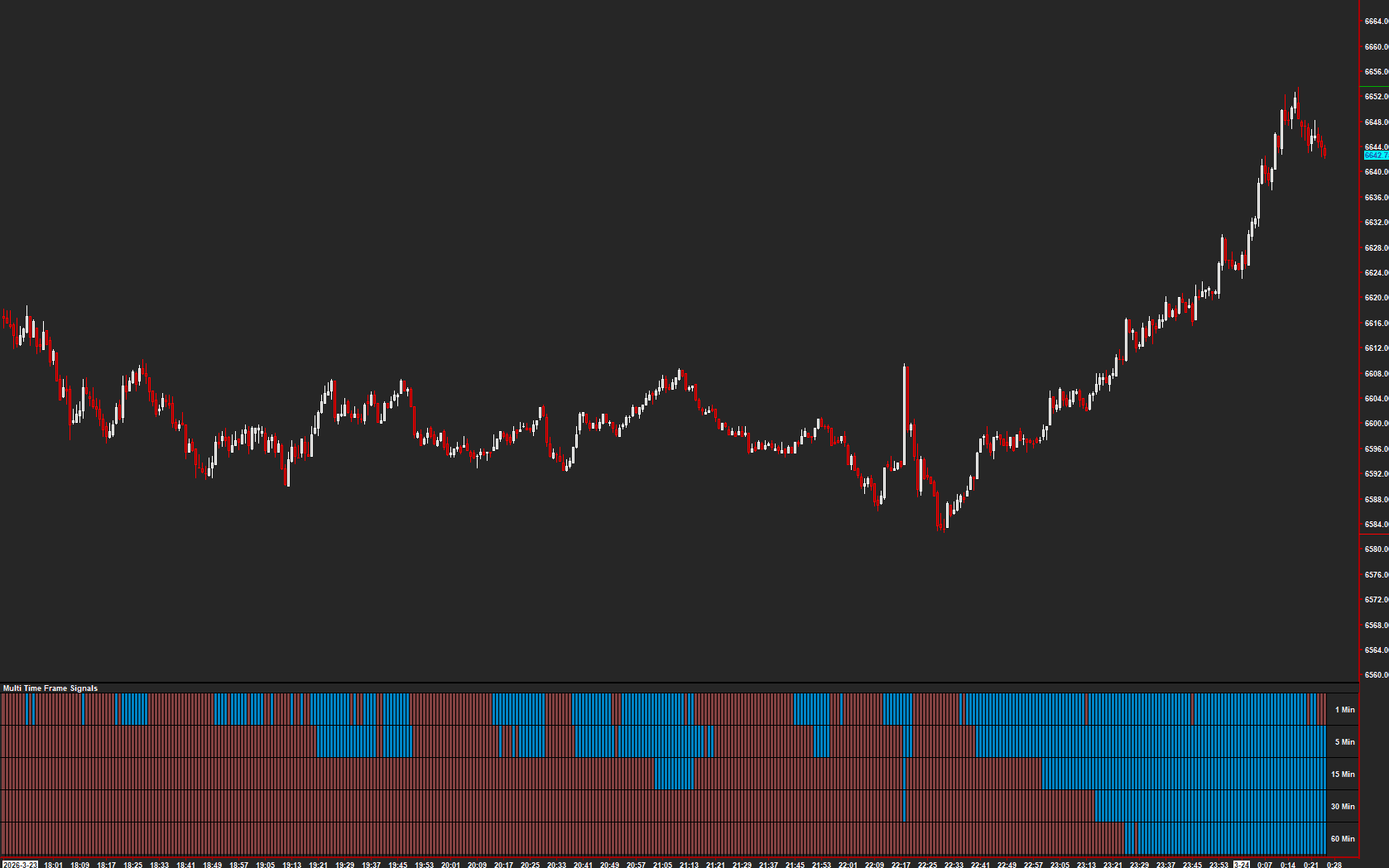
A custom study for importing alerts from a linked chart and displaying them in tabular format, similar to Sierra Chart's 'Number Bars Calculated Values' study. Enables multi-timeframe signal confirmation from a single chart view.
The Concept
Multi-Time Frame Signals aggregates alert conditions from linked charts into a single tabular display on your primary chart. Instead of switching between charts to check if signals align across timeframes, you see all conditions at once in a color-coded grid — making multi-timeframe confirmation immediate and effortless.
How to Read It
A color-coded grid shows signal status across up to five rows.
- Colored cells indicate the referenced alert condition is active on the linked chart
- Uncolored cells indicate no signal on that timeframe
- When multiple rows light up simultaneously, signals are confirming across timeframes
- Subgraph labels identify which timeframe or condition each row represents
Practical Tips
Each signal row references a study subgraph on a linked chart — typically a Color Bar Based on Alert Condition study. Set up reference charts at different timeframes with your preferred alert conditions. Enable Auto-Hide Unused Rows to keep the display compact. The Grid Style subgraph controls the visual appearance of separator lines.
Requirements
- Requires Sierra Chart version 2347 or later
Input & Settings
| No. | Input Name | Function |
|---|---|---|
| 1 | Background Color | Defines the background color used for the alert grid. |
| 2 | Transparent Background | If enabled, the 'Background Color' is ignored, and instead the alert grid background is colored the same as the underlying chart. |
| 3 | Show Labels on Right | Subgraph labels are displayed at the right hand edge of the chart window when enabled, otherwise at the left hand edge. |
| 4 | Draw Grid | Defines whether or not a grid is drawn separating each row and column in the alert grid. The color, line style and line weight are controlled by the 'Grid Style' subgraph. |
| 5 | Hide Labels | When enabled, no subgraph labels will be drawn. |
| 6 | Color - Signal | Defines the cell color used when the reference alert study evaluates as non-zero. |
| 7 | Color - No Signal | Defines the cell color used when the reference alert study evaluates as zero. |
| 8 | Auto-Hide Unused Rows | When enabled, any alert row that is disabled will be automatically hidden. |
| 9 | Signal 1 Enabled | Sets the state for the first alert grid row. |
| 10 | Chart Study Subgraph Reference | Defines the reference study subgraph used for Signal 1 row. Typically references a Color Bar Based on Alert Condition study. |
| 11 | Signal 2 Enabled | Sets the state for the second alert grid row. |
| 12 | Chart Study Subgraph Reference | Defines the reference study subgraph used for Signal 2 row. |
| 13 | Signal 3 Enabled | Sets the state for the third alert grid row. |
| 14 | Chart Study Subgraph Reference | Defines the reference study subgraph used for Signal 3 row. |
| 15 | Signal 4 Enabled | Sets the state for the fourth alert grid row. |
| 16 | Chart Study Subgraph Reference | Defines the reference study subgraph used for Signal 4 row. |
| 17 | Signal 5 Enabled | Sets the state for the fifth alert grid row. |
| 18 | Chart Study Subgraph Reference | Defines the reference study subgraph used for Signal 5 row. |
Defines the background color used for the alert grid.
If enabled, the 'Background Color' is ignored, and instead the alert grid background is colored the same as the underlying chart.
Subgraph labels are displayed at the right hand edge of the chart window when enabled, otherwise at the left hand edge.
Defines whether or not a grid is drawn separating each row and column in the alert grid. The color, line style and line weight are controlled by the 'Grid Style' subgraph.
When enabled, no subgraph labels will be drawn.
Defines the cell color used when the reference alert study evaluates as non-zero.
Defines the cell color used when the reference alert study evaluates as zero.
When enabled, any alert row that is disabled will be automatically hidden.
Sets the state for the first alert grid row.
Defines the reference study subgraph used for Signal 1 row. Typically references a Color Bar Based on Alert Condition study.
Sets the state for the second alert grid row.
Defines the reference study subgraph used for Signal 2 row.
Sets the state for the third alert grid row.
Defines the reference study subgraph used for Signal 3 row.
Sets the state for the fourth alert grid row.
Defines the reference study subgraph used for Signal 4 row.
Sets the state for the fifth alert grid row.
Defines the reference study subgraph used for Signal 5 row.
Subgraphs
| No. | Subgraph Name | Function & Comments |
|---|---|---|
| 1 | Signal 1 | Default: Visible. Displays result of 'Signal 1' alert condition. |
| 2 | Signal 2 | Default: Visible. Displays result of 'Signal 2' alert condition. |
| 3 | Signal 3 | Default: Visible. Displays result of 'Signal 3' alert condition. |
| 4 | Signal 4 | Default: Visible. Displays result of 'Signal 4' alert condition. |
| 5 | Signal 5 | Default: Visible. Displays result of 'Signal 5' alert condition. |
| 6 | Grid Style | Default: Visible. Determines the line style, color and weight used when drawing the gridlines for the alert grid. |
Default: Visible. Displays result of 'Signal 1' alert condition.
Default: Visible. Displays result of 'Signal 2' alert condition.
Default: Visible. Displays result of 'Signal 3' alert condition.
Default: Visible. Displays result of 'Signal 4' alert condition.
Default: Visible. Displays result of 'Signal 5' alert condition.
Default: Visible. Determines the line style, color and weight used when drawing the gridlines for the alert grid.
Get Access to Every Study
All studies are included with the Gold License — proprietary Sierra Chart tools, Discord community access, and the full AMT framework.
Get the Gold License — $125/mo