
AMT Previous Day OHLC
Prior day open, high, low, close, and midpoint as reference levels
Draws the previous trading day's open, high, low, close, and midpoint as horizontal reference lines across the current session. Supports two modes: reference a separate daily chart for settlement prices, or compute levels automatically from the current chart's session boundaries.
The Concept
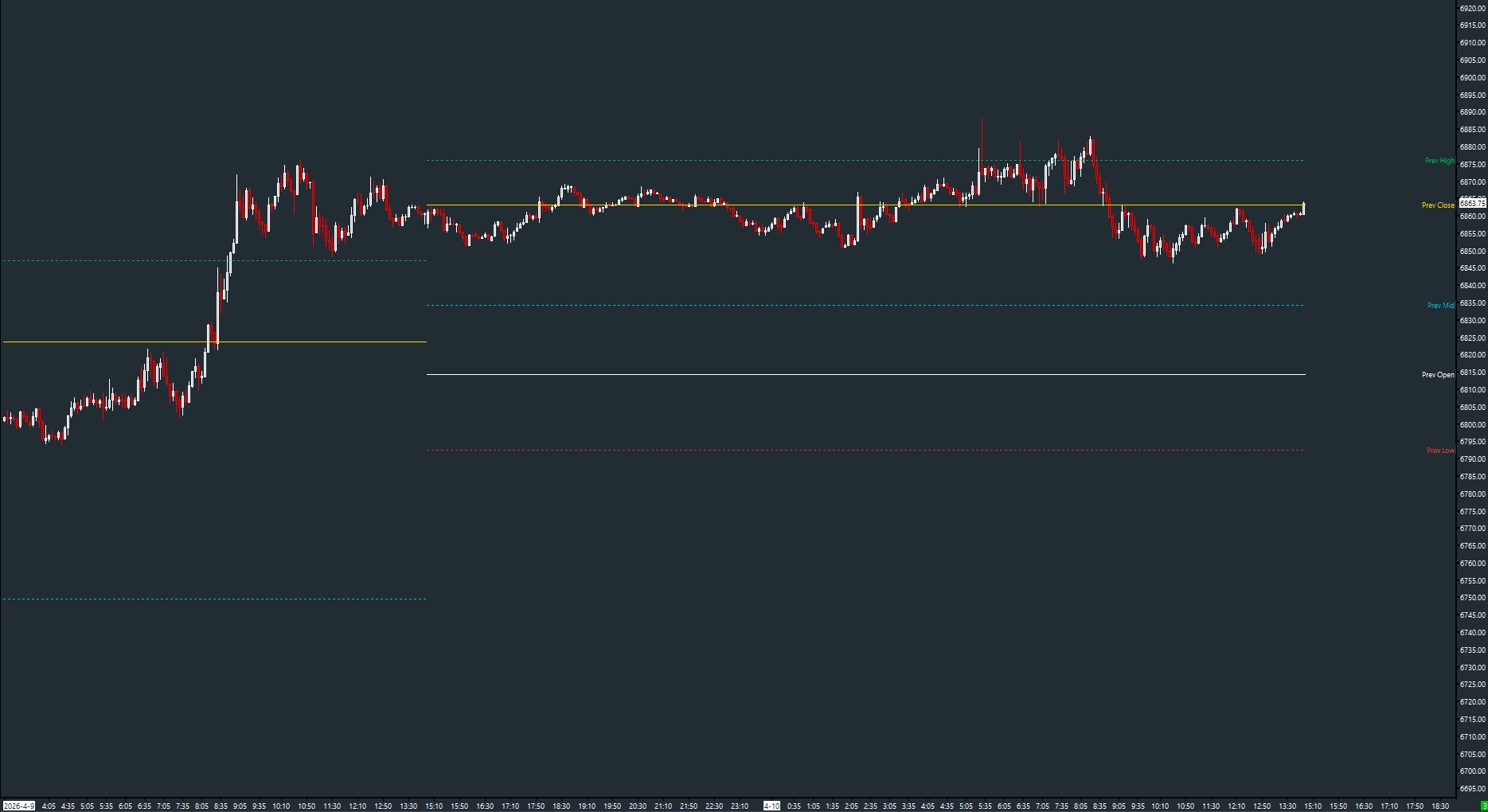
Yesterday's high, low, and close are among the most watched levels in intraday trading. They mark prior price extremes and a closing reference; they are not the boundaries of a calculated value area. This study automatically plots these levels so you never have to manually draw them or look up yesterday's range.
How to Read It
Five reference levels are drawn as dashed horizontal lines across the current session.
- Prev High (green dotted) — prior day's high, an upper reference
- Prev Low (red dotted) — prior day's low, a lower reference
- Prev Close (gold) — the reference chart close or session closing price; confirm which definition the source uses
- Prev Open (white) — the prior day's opening price
- Prev Mid (cyan dotted) — arithmetic midpoint of the prior day's high and low, not a volume or value-area calculation
Practical Tips
For futures, a separate daily chart can provide a settlement reference when its data source uses settlement as the daily close. Verify that setting before comparing it with an intraday close. Set the 'Daily Chart #' input to the chart number of a daily chart with the same symbol. If left at 0, levels are computed from the current chart's intraday session boundaries, which works well for most use cases.
Input & Settings
| No. | Input Name | Function |
|---|---|---|
| 1 | Daily Chart # | Chart number of a daily reference chart for settlement prices. Set to 0 to compute levels from the current chart's session boundaries. Default: 0. |
Chart number of a daily reference chart for settlement prices. Set to 0 to compute levels from the current chart's session boundaries. Default: 0.
Subgraphs
| No. | Subgraph Name | Function & Comments |
|---|---|---|
| 1 | Prev Open | Default: Dash. The previous day's opening price, displayed as a white dashed line. |
| 2 | Prev High | Default: Dash (dotted). The previous day's high price, displayed as a green dotted line. |
| 3 | Prev Low | Default: Dash (dotted). The previous day's low price, displayed as a red dotted line. |
| 4 | Prev Close | Default: Dash. The previous day's close/settlement price, displayed as a gold dashed line. |
| 5 | Prev Mid | Default: Dash (dotted). The midpoint of the previous day's range, displayed as a cyan dotted line. |
Default: Dash. The previous day's opening price, displayed as a white dashed line.
Default: Dash (dotted). The previous day's high price, displayed as a green dotted line.
Default: Dash (dotted). The previous day's low price, displayed as a red dotted line.
Default: Dash. The previous day's close/settlement price, displayed as a gold dashed line.
Default: Dash (dotted). The midpoint of the previous day's range, displayed as a cyan dotted line.
Free with the AMT Toolkit
This study is part of the AMT Toolkit — a free collection of Sierra Chart studies for orderflow, market structure, and chart utilities. 100% free, with no AMT Gold membership or credit card required.
Sierra Chart and applicable market-data fees are separate.
Get the AMT Toolkit — Free