
AMT Previous Week OHLC
Prior week open, high, low, close, and midpoint as reference levels
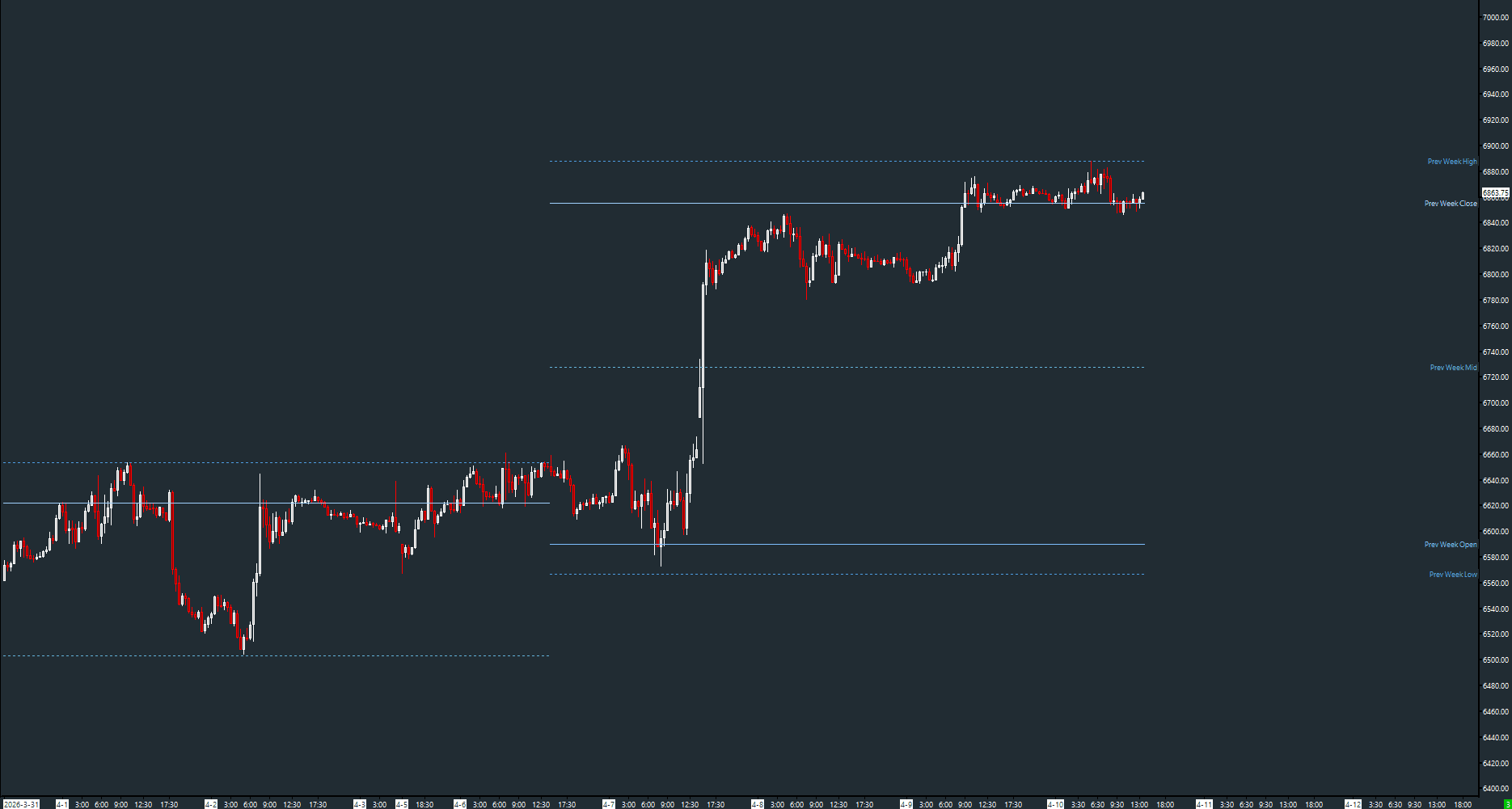
Draws the previous trading week's open, high, low, close, and midpoint as horizontal reference lines. Automatically detects week boundaries including holiday-adjusted calendars. Supports both reference weekly chart and automatic session-based computation.
The Concept
Weekly levels provide a higher-timeframe context that intraday traders frequently reference. The prior week's high and low define a range that the current week's price action will either stay within (balance) or break out of (range extension). These levels are especially important for swing traders and for framing daily bias.
How to Read It
Five reference levels are drawn as dashed horizontal lines across the current week.
- Prev Week High and Low define last week's range — breaks above/below signal range extension
- Prev Week Close is often tested early in the new week as a reference for continuation or reversal
- Prev Week Mid represents the center of last week's value — price above it leans bullish, below leans bearish
- Prev Week Open shows where the prior week started relative to where it ended
Practical Tips
Like the daily version, you can reference a separate weekly chart via the 'Weekly Chart #' input for precise settlement data, or leave it at 0 for automatic computation. The study handles Monday holidays by detecting week rollover when the day of week decreases.
Input & Settings
| No. | Input Name | Function |
|---|---|---|
| 1 | Weekly Chart # | Chart number of a weekly reference chart. Set to 0 to compute levels from the current chart's session boundaries. Default: 0. |
Chart number of a weekly reference chart. Set to 0 to compute levels from the current chart's session boundaries. Default: 0.
Subgraphs
| No. | Subgraph Name | Function & Comments |
|---|---|---|
| 1 | Prev Week Open | Default: Dash. The previous week's opening price, displayed as a light blue dashed line. |
| 2 | Prev Week High | Default: Dash (dotted). The previous week's high price, displayed as a blue dotted line. |
| 3 | Prev Week Low | Default: Dash (dotted). The previous week's low price, displayed as a blue dotted line. |
| 4 | Prev Week Close | Default: Dash. The previous week's closing price, displayed as a light blue dashed line. |
| 5 | Prev Week Mid | Default: Dash (dotted). The midpoint of the previous week's range, displayed as a teal dotted line. |
Default: Dash. The previous week's opening price, displayed as a light blue dashed line.
Default: Dash (dotted). The previous week's high price, displayed as a blue dotted line.
Default: Dash (dotted). The previous week's low price, displayed as a blue dotted line.
Default: Dash. The previous week's closing price, displayed as a light blue dashed line.
Default: Dash (dotted). The midpoint of the previous week's range, displayed as a teal dotted line.
Free with the AMT Toolkit
This study is part of the AMT Toolkit — a free collection of Sierra Chart studies for orderflow, market structure, and chart utilities. 100% free, with no AMT Gold membership or credit card required.
Sierra Chart and applicable market-data fees are separate.
Get the AMT Toolkit — Free