AMT TP
Combined Time and Price analysis for trend strength and reversal detection
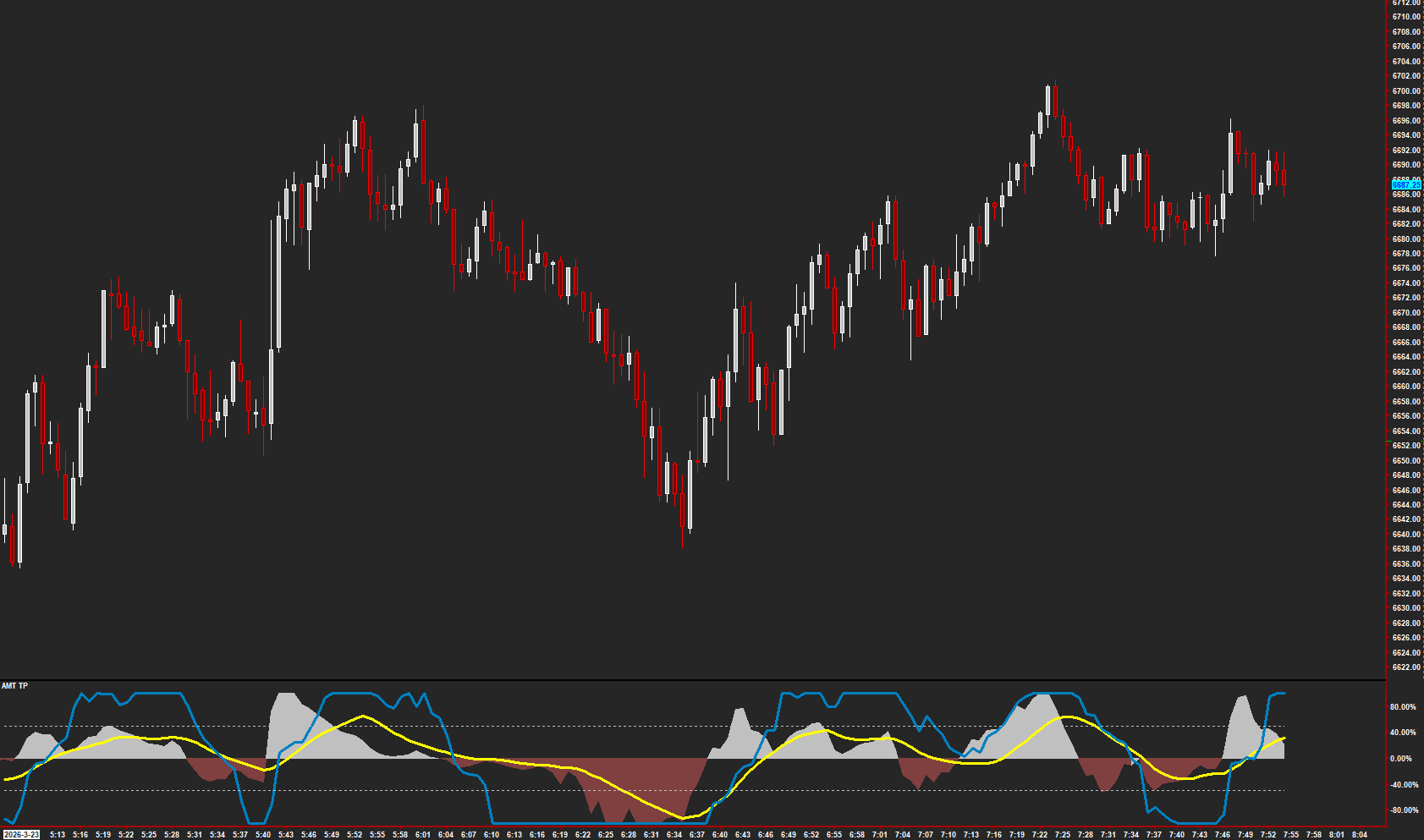
A unified study combining AMT's Time and Price methodologies into a single tool. The Price component acts as a leading indicator of directional changes using volume-weighted momentum, while the Time component reads overbought/oversold in a way that's counterintuitive to traditional oscillators — you buy when entering overbought and sell when entering oversold. This is the correct AMT read: momentum entering overbought means strength is building, not exhaustion.
The Concept
AMT TP combines two independent analyses — Time and Price — into a single study. The Price component measures volume-weighted directional momentum as a histogram, acting as a leading indicator of directional changes. The Time component is a smoothed oscillator that reads overbought and oversold in a way that's counterintuitive to traditional oscillators.
How to Read It
Price and Time components are displayed together in a separate chart region.
- Price histogram above zero with rising MA confirms bullish momentum
- Price histogram below zero with falling MA confirms bearish momentum
- Time entering the overbought zone (above Max) signals strength building — this is a buy signal, not exhaustion
- Time entering the oversold zone (below Min) signals weakness building — this is a sell signal, not a reversal setup
Practical Tips
The Time component reads opposite to traditional oscillators: entering overbought means momentum is building (buy), entering oversold means momentum is fading (sell). The Price component's slope change markers highlight early momentum shifts. When both Price and Time align, conviction is highest. Adjust the normalization lookback to match your chart timeframe.
Requirements
- Displayed in a separate chart region (not overlaid on price)
Input & Settings
| No. | Input Name | Function |
|---|---|---|
| 1 | Smoothing Type | Sets the moving average type used for smoothing the Price component. Default: Exponential. |
| 2 | Smoothing Short Period | The short smoothing period for the Price component. Min: 1. Default: 3. |
| 3 | Smoothing Long Period | The long smoothing period for the Price component. Min: 1. Default: 10. |
| 4 | Moving Average Type | The type of moving average applied to the Price component output. Default: Simple. |
| 5 | Moving Average Length | The length of the moving average applied to the Price component. Min: 1. Default: 13. |
| 6 | Normalize | When enabled, normalizes the Price component output to a fixed range. Default: Yes. |
| 7 | Normalize LookBack Period | Number of bars used for the normalization range calculation. Min: 0, Max: 1000. Default: 25. |
| 8 | Show MA | Controls whether the moving average line is displayed on the Price component. Default: Yes. |
| 9 | Arrow Size | Sets the size of the directional arrow markers. Min: 1, Max: 50. Default: 2. |
| 10 | Arrow Hide | When enabled, hides the directional arrow markers. Default: Yes (hidden). |
| 11 | Slope Change Indi Size | Sets the size of the slope change diamond markers. Min: 1, Max: 50. Default: 1. |
| 12 | Slope Hide | When enabled, hides the slope change diamond markers. Default: Yes (hidden). |
| 13 | Input Data | Selects the price data used for the Price component calculation. Default: Last/Close. |
| 14 | AMT T-Line | The damping factor for the Time component line. Controls how smoothly the T-Line responds to changes. Min: 0, Max: 1. Default: 0.7. |
| 15 | Max | Sets the upper threshold line for the Time component, indicating overbought conditions. Min: 0, Max: 1. Default: 0.75. |
| 16 | Min | Sets the lower threshold line for the Time component, indicating oversold conditions. Min: 0, Max: 1. Default: 0.25. |
Sets the moving average type used for smoothing the Price component. Default: Exponential.
The short smoothing period for the Price component. Min: 1. Default: 3.
The long smoothing period for the Price component. Min: 1. Default: 10.
The type of moving average applied to the Price component output. Default: Simple.
The length of the moving average applied to the Price component. Min: 1. Default: 13.
When enabled, normalizes the Price component output to a fixed range. Default: Yes.
Number of bars used for the normalization range calculation. Min: 0, Max: 1000. Default: 25.
Controls whether the moving average line is displayed on the Price component. Default: Yes.
Sets the size of the directional arrow markers. Min: 1, Max: 50. Default: 2.
When enabled, hides the directional arrow markers. Default: Yes (hidden).
Sets the size of the slope change diamond markers. Min: 1, Max: 50. Default: 1.
When enabled, hides the slope change diamond markers. Default: Yes (hidden).
Selects the price data used for the Price component calculation. Default: Last/Close.
The damping factor for the Time component line. Controls how smoothly the T-Line responds to changes. Min: 0, Max: 1. Default: 0.7.
Sets the upper threshold line for the Time component, indicating overbought conditions. Min: 0, Max: 1. Default: 0.75.
Sets the lower threshold line for the Time component, indicating oversold conditions. Min: 0, Max: 1. Default: 0.25.
Subgraphs
| No. | Subgraph Name | Function & Comments |
|---|---|---|
| 1 | AMT Price | Default: Fill to Zero. The primary Price component, filled positive (teal) and negative (red) relative to zero. Shows directional momentum. |
| 2 | AMT Price Border | Default: Line. Border line for the Price component, auto-colored by slope — cyan when rising, pink when falling. |
| 3 | MA | Default: Line. Moving average of the Price component. Useful for identifying when momentum crosses above or below its average. |
| 4 | Zero Line | Default: Line. The zero reference line separating positive and negative momentum. |
| 5 | Up Arrows | Default: Arrow. Marks points where momentum direction shifts upward. Hidden by default via the Arrow Hide input. |
| 6 | Down Arrows | Default: Arrow. Marks points where momentum direction shifts downward. Hidden by default via the Arrow Hide input. |
| 7 | Slope Change | Default: Diamond. Marks points where the slope of the Price component changes direction. Hidden by default via the Slope Hide input. |
| 8 | AMT T-Line | Default: Line. The Time component output — a smoothed oscillator that moves between 0 and 1. Readings near Max suggest overbought; near Min suggest oversold. |
| 9 | Max | Default: Line. Upper threshold line for the Time component, marking the overbought zone. |
| 10 | Min | Default: Line. Lower threshold line for the Time component, marking the oversold zone. |
Default: Fill to Zero. The primary Price component, filled positive (teal) and negative (red) relative to zero. Shows directional momentum.
Default: Line. Border line for the Price component, auto-colored by slope — cyan when rising, pink when falling.
Default: Line. Moving average of the Price component. Useful for identifying when momentum crosses above or below its average.
Default: Line. The zero reference line separating positive and negative momentum.
Default: Arrow. Marks points where momentum direction shifts upward. Hidden by default via the Arrow Hide input.
Default: Arrow. Marks points where momentum direction shifts downward. Hidden by default via the Arrow Hide input.
Default: Diamond. Marks points where the slope of the Price component changes direction. Hidden by default via the Slope Hide input.
Default: Line. The Time component output — a smoothed oscillator that moves between 0 and 1. Readings near Max suggest overbought; near Min suggest oversold.
Default: Line. Upper threshold line for the Time component, marking the overbought zone.
Default: Line. Lower threshold line for the Time component, marking the oversold zone.
Get Access to Every Study
All studies are included with the Gold License — proprietary Sierra Chart tools, Discord community access, and the full AMT framework.
Get the Gold License — $125/mo