
AMT Absorption Zones
Delta-based passive absorption detection with zone drawing
Automatically detects where passive liquidity absorbed aggressive order flow using footprint delta analysis, then draws shaded zones at those levels for potential retest trades. Features configurable delta thresholds, rejection confirmation, zone expiration, and invalidation handling.
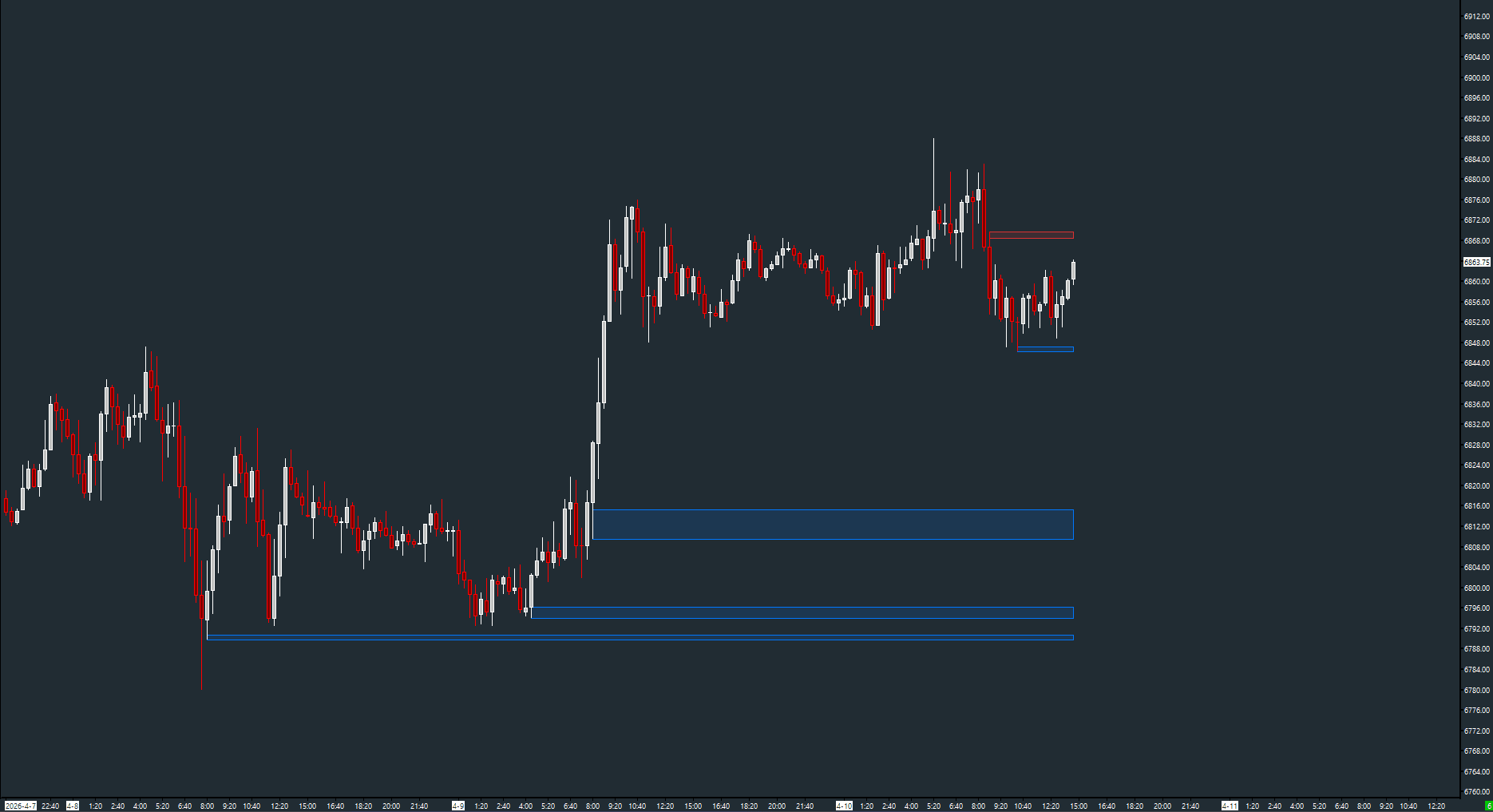
The Concept
Absorption occurs when passive limit orders absorb aggressive market orders without allowing price to move further. These events are visible in footprint data — strong directional aggression that fails to produce price follow-through. Absorption Zones automatically identifies these moments and draws levels at the absorption points. These levels often become significant because the passive participant demonstrated they have size to defend that price.
How to Read It
Shaded zones appear on the chart where absorption was detected.
- Red sell zones appear at bar highs where aggressive buyers were absorbed by passive sellers
- Blue buy zones appear at bar lows where aggressive sellers were absorbed by passive buyers
- Zones extend forward in time until price retests them or they expire
- Invalidated zones change color (or are erased) based on the Invalidated Zone Mode setting
Practical Tips
Use Auto mode (default) so the detection scales automatically with each instrument's typical volume. In Manual mode, adjust the delta threshold based on your instrument — higher for ES, lower for thinner products. Raise the sensitivity inputs for fewer but higher-conviction zones, lower them for more signals. Enable zone expiration to clean up stale zones after N bars.
Requirements
- Requires 'Maintain Volume at Price Data' enabled on the chart
Input & Settings
| No. | Input Name | Function |
|---|---|---|
| 1 | Delta Threshold Mode | How the delta threshold is determined. Manual = fixed value. Auto = percentage of bar volume. Default: Auto. |
| 2 | Manual: Min Delta | Fixed minimum delta sum across the absorption levels in Manual mode. Default: 250. Range: 10–100000. |
| 3 | Auto: Delta % of Bar Volume | In Auto mode, the minimum delta as a percentage of the bar's total volume. Default: 15. Range: 1–100. |
| 4 | Min Consecutive Levels | Minimum number of consecutive price levels with qualifying delta. Default: 3. Range: 2–20. |
| 5 | Min Rejection Distance (Points) | Minimum price rejection distance from the absorption extreme to confirm the zone. Default: 5.0. |
| 6 | Bars to Confirm Rejection | Number of bars after absorption to confirm the rejection. Default: 3. Range: 1–50. |
| 7 | Sell Absorption Zone Color | Color for sell absorption zones. Default: Red. |
| 8 | Buy Absorption Zone Color | Color for buy absorption zones. Default: Blue. |
| 9 | Border Width | Width of zone border lines. Default: 1. |
| 10 | Transparency Level | Zone fill transparency. 0 = opaque, 100 = invisible. Default: 85. |
| 11 | Max Visible Zones | Maximum number of active zones displayed. Default: 20. Range: 0–100. |
| 12 | Invalidated Zone Mode | How invalidated zones are handled. Erase = remove. Gray = recolor. Clip = trim. Default: Gray. |
| 13 | Invalidated Zone Color | Color for invalidated zones when mode is Gray. Default: Dark gray. |
| 14 | Enable Zone Expiration | When enabled, zones expire after a configurable number of bars. Default: No. |
| 15 | Expiration (Bars) | Number of bars before a zone expires. Default: 200. Range: 1–10000. |
How the delta threshold is determined. Manual = fixed value. Auto = percentage of bar volume. Default: Auto.
Fixed minimum delta sum across the absorption levels in Manual mode. Default: 250. Range: 10–100000.
In Auto mode, the minimum delta as a percentage of the bar's total volume. Default: 15. Range: 1–100.
Minimum number of consecutive price levels with qualifying delta. Default: 3. Range: 2–20.
Minimum price rejection distance from the absorption extreme to confirm the zone. Default: 5.0.
Number of bars after absorption to confirm the rejection. Default: 3. Range: 1–50.
Color for sell absorption zones. Default: Red.
Color for buy absorption zones. Default: Blue.
Width of zone border lines. Default: 1.
Zone fill transparency. 0 = opaque, 100 = invisible. Default: 85.
Maximum number of active zones displayed. Default: 20. Range: 0–100.
How invalidated zones are handled. Erase = remove. Gray = recolor. Clip = trim. Default: Gray.
Color for invalidated zones when mode is Gray. Default: Dark gray.
When enabled, zones expire after a configurable number of bars. Default: No.
Number of bars before a zone expires. Default: 200. Range: 1–10000.
Subgraphs
| No. | Subgraph Name | Function & Comments |
|---|---|---|
| 1 | Absorption | Default: Ignore. Internal subgraph. Zones are rendered as chart drawings. |
Default: Ignore. Internal subgraph. Zones are rendered as chart drawings.
Free with the AMT Toolkit
This study is part of the AMT Toolkit — a free collection of Sierra Chart studies for orderflow, market structure, and chart utilities. 100% free, with no AMT Gold membership or credit card required.
Sierra Chart and applicable market-data fees are separate.
Get the AMT Toolkit — Free