
AMT Delta Gauge
Real-time speedometer gauge for delta momentum
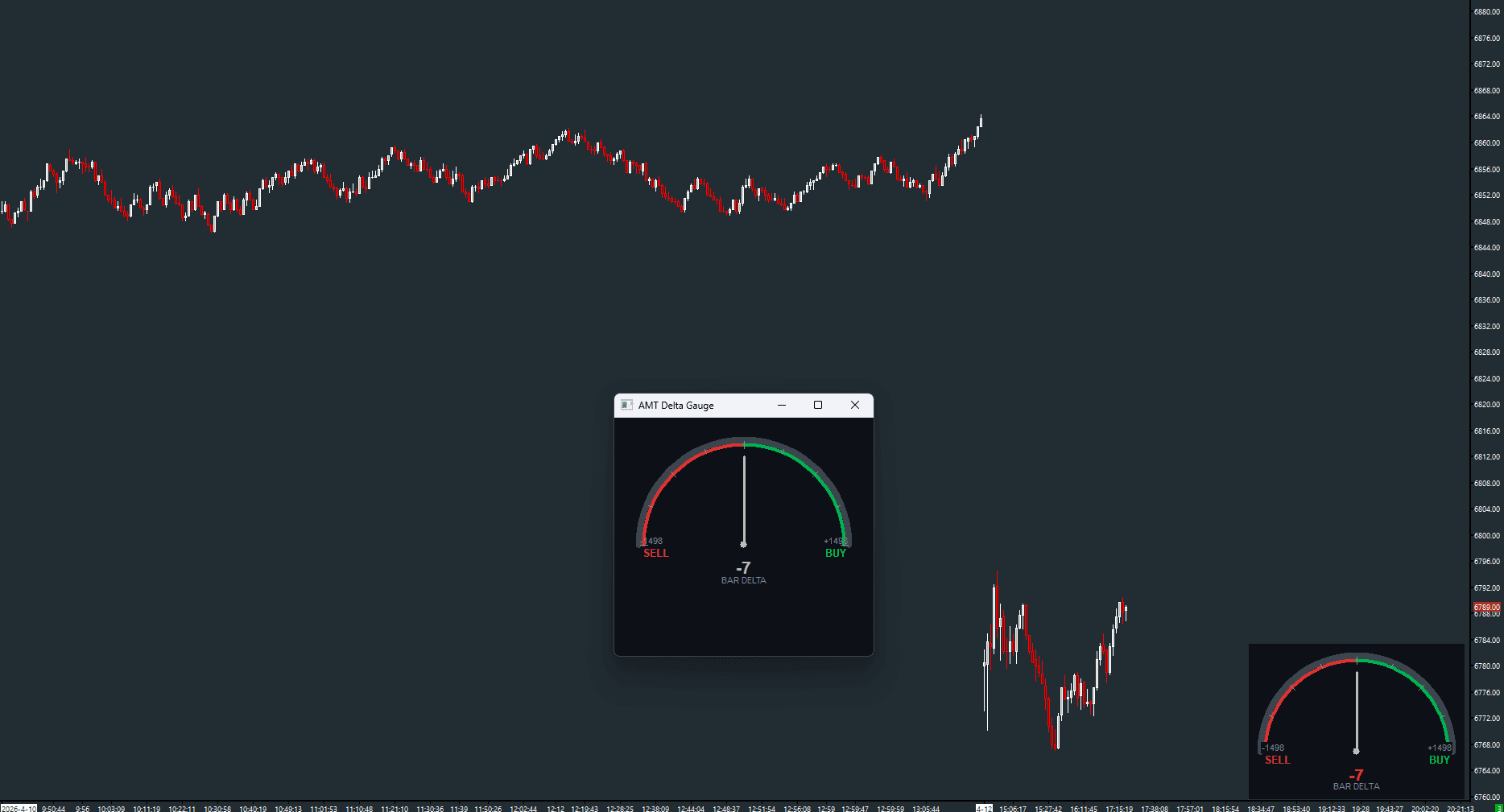
A visual GDI-rendered speedometer gauge overlaid on the chart showing real-time delta. The needle sweeps from sell (left, red) to buy (right, green) with intensity-based coloring. Supports per-bar, rolling window, and session cumulative modes.
The Concept
Delta Gauge takes the raw delta number and presents it as an intuitive analog gauge — like a car's speedometer but for order flow. The needle position instantly communicates the magnitude and direction of buying or selling pressure. This is especially useful for discretionary traders who want a quick, ambient read on order flow without studying histograms.
How to Read It
The gauge needle sweeps between sell (left) and buy (right).
- Needle right of center with green color = net buying pressure on this measurement
- Needle left of center with red color = net selling pressure
- Needle near center (gray) = balanced or low-activity bar
- The numeric value below the gauge shows the exact delta figure
Modes
Three measurement modes are available. Bar mode (default) shows delta for the current bar — resets each bar. Rolling mode accumulates delta across a configurable number of bars for a smoother read. Session mode shows cumulative delta since the session open, equivalent to a CVD value. The gauge can be displayed on the chart (GDI overlay) or in a detached popup window.
Input & Settings
| No. | Input Name | Function |
|---|---|---|
| 1 | Mode | Delta measurement mode. 0 = Per-bar delta, 1 = Rolling N-bar delta, 2 = Session cumulative delta. Default: 0. |
| 2 | Rolling Period (Bars) | Number of bars to accumulate when Mode is Rolling. Default: 10. Range: 1–500. |
| 3 | Max Scale (0=Auto) | Maximum gauge scale value. 0 = auto-scale based on recent bars. Default: 0. |
| 4 | Gauge Radius (pixels) | Size of the gauge in pixels. Default: 120. Range: 50–300. |
| 5 | Position | Gauge location on the chart. 0 = Top Right, 1 = Top Left, 2 = Bottom Right, 3 = Bottom Left. Default: 0. |
| 6 | Background Opacity | Opacity of the gauge background panel. 0 = fully opaque, 255 = invisible. Default: 200. |
| 7 | Display | Rendering mode. 0 = On Chart (GDI overlay), 1 = Popup Window. Default: 0. |
Delta measurement mode. 0 = Per-bar delta, 1 = Rolling N-bar delta, 2 = Session cumulative delta. Default: 0.
Number of bars to accumulate when Mode is Rolling. Default: 10. Range: 1–500.
Maximum gauge scale value. 0 = auto-scale based on recent bars. Default: 0.
Size of the gauge in pixels. Default: 120. Range: 50–300.
Gauge location on the chart. 0 = Top Right, 1 = Top Left, 2 = Bottom Right, 3 = Bottom Left. Default: 0.
Opacity of the gauge background panel. 0 = fully opaque, 255 = invisible. Default: 200.
Rendering mode. 0 = On Chart (GDI overlay), 1 = Popup Window. Default: 0.
Subgraphs
| No. | Subgraph Name | Function & Comments |
|---|---|---|
| 1 | Gauge Delta | Default: Ignore. Internal subgraph storing the computed delta value. Not displayed directly — the gauge is rendered via GDI. |
Default: Ignore. Internal subgraph storing the computed delta value. Not displayed directly — the gauge is rendered via GDI.
Free with the AMT Toolkit
This study is part of the AMT Toolkit — a free collection of Sierra Chart studies for orderflow, market structure, and chart utilities. 100% free, with no AMT Gold membership or credit card required.
Sierra Chart and applicable market-data fees are separate.
Get the AMT Toolkit — Free