
AMT Harmonic Rotations
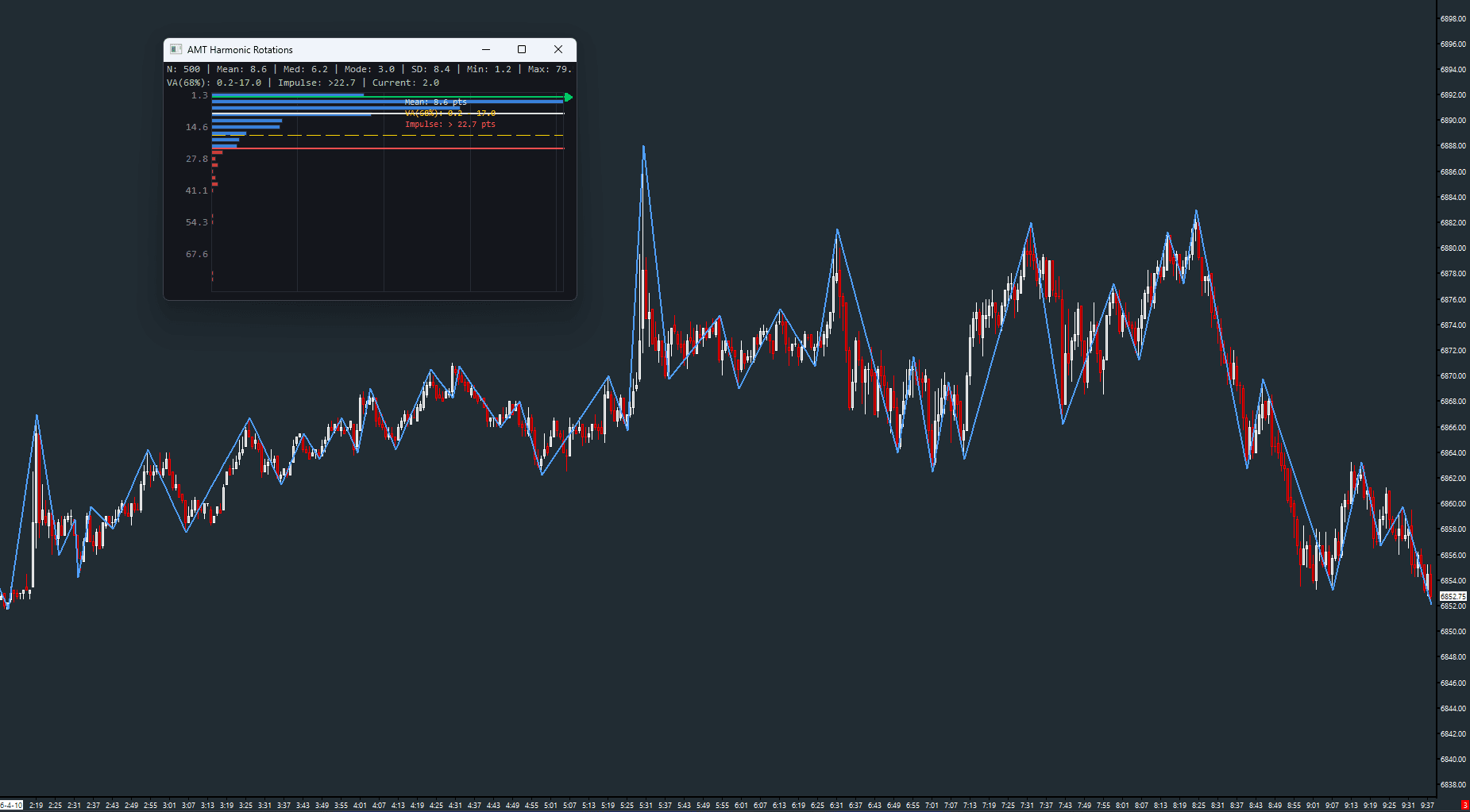
Swing rotation statistics with GDI analytics panel
Computes swing rotations and displays comprehensive statistics — mean, median, mode, standard deviation, value area, and impulse detection — in a popup GDI panel with a distribution histogram. Helps answer the question: how big are normal rotations in this market right now?
The Concept
Markets rotate between highs and lows in patterns that tend to cluster around a characteristic size. Harmonic Rotations measures these rotation sizes and builds a statistical profile: what's the average rotation, how much do they vary, and when does a current move exceed what's normal? When a move is statistically unusual compared to the recent history, it signals a potentially impulsive, trend-initiating event.
How to Read It
The rotation line is drawn on the chart, and the statistics panel provides the analytical context.
- Mean rotation tells you the typical swing size — rotations near the mean are 'normal'
- The value area captures the majority of rotations — expect most moves to stay within this range
- Impulse threshold marks moves that are statistically unusual — potential trend initiators
- The histogram shows the distribution of rotation sizes so you can see clustering and outliers
- Current leg size is tracked live against the historical profile
Practical Tips
The reversal amount determines swing sensitivity — smaller values produce more rotations and noisier stats, larger values focus on significant moves. Use ATR-Based mode to automatically adapt the reversal to current volatility. The Impulse Factor can be adjusted — lower it to catch more moves, raise it for only the most extreme rotations. Use the time filter inputs to restrict analysis to your trading session.
Input & Settings
| No. | Input Name | Function |
|---|---|---|
| 1 | Reversal Amount | Minimum price reversal required to form a new swing. Default: 1.0. |
| 2 | Num Bars Required for Reversal | Minimum bars before a new reversal is confirmed. Default: 5. Range: 1–100. |
| 3 | Units | Unit for the reversal amount and stats display. Options: Points, Ticks. Default: Points. |
| 4 | Show Stats Window | Controls whether the popup statistics window is displayed. Default: Yes. |
| 5 | Impulse Factor | Standard deviation multiplier for the impulse threshold. Default: 1.666. Range: 0.5–5.0. |
| 6 | Histogram Layout | Orientation of the distribution histogram. Options: Horizontal, Vertical. Default: Horizontal. |
| 7 | Reversal Mode | How the reversal amount is determined. Manual = use the fixed value. ATR-Based = derive from ATR. Default: Manual. |
| 8 | ATR Period | ATR lookback period when Reversal Mode is ATR-Based. Default: 14. Range: 1–200. |
| 9 | Start Time | Time filter start. 0 = no filter (include all bars). Default: 0. |
| 10 | End Time | Time filter end. 0 = no filter (include all bars). Default: 0. |
Minimum price reversal required to form a new swing. Default: 1.0.
Minimum bars before a new reversal is confirmed. Default: 5. Range: 1–100.
Unit for the reversal amount and stats display. Options: Points, Ticks. Default: Points.
Controls whether the popup statistics window is displayed. Default: Yes.
Standard deviation multiplier for the impulse threshold. Default: 1.666. Range: 0.5–5.0.
Orientation of the distribution histogram. Options: Horizontal, Vertical. Default: Horizontal.
How the reversal amount is determined. Manual = use the fixed value. ATR-Based = derive from ATR. Default: Manual.
ATR lookback period when Reversal Mode is ATR-Based. Default: 14. Range: 1–200.
Time filter start. 0 = no filter (include all bars). Default: 0.
Time filter end. 0 = no filter (include all bars). Default: 0.
Subgraphs
| No. | Subgraph Name | Function & Comments |
|---|---|---|
| 1 | Rotation Line | Default: Line. The rotation line connecting swing highs and lows on the chart. Blue, width 2. |
| 2 | Rotation Size | Default: Ignore. Internal storage for computed rotation sizes. |
| 3 | Peak Type | Default: Ignore. Internal storage for swing peak type classification. |
Default: Line. The rotation line connecting swing highs and lows on the chart. Blue, width 2.
Default: Ignore. Internal storage for computed rotation sizes.
Default: Ignore. Internal storage for swing peak type classification.
Free with the AMT Toolkit
This study is part of the AMT Toolkit — a free collection of Sierra Chart studies for orderflow, market structure, and chart utilities. 100% free, with no AMT Gold membership or credit card required.
Sierra Chart and applicable market-data fees are separate.
Get the AMT Toolkit — Free