
AMT Reaction Zones
Retracement zones from price rotations with impulsive move filtering
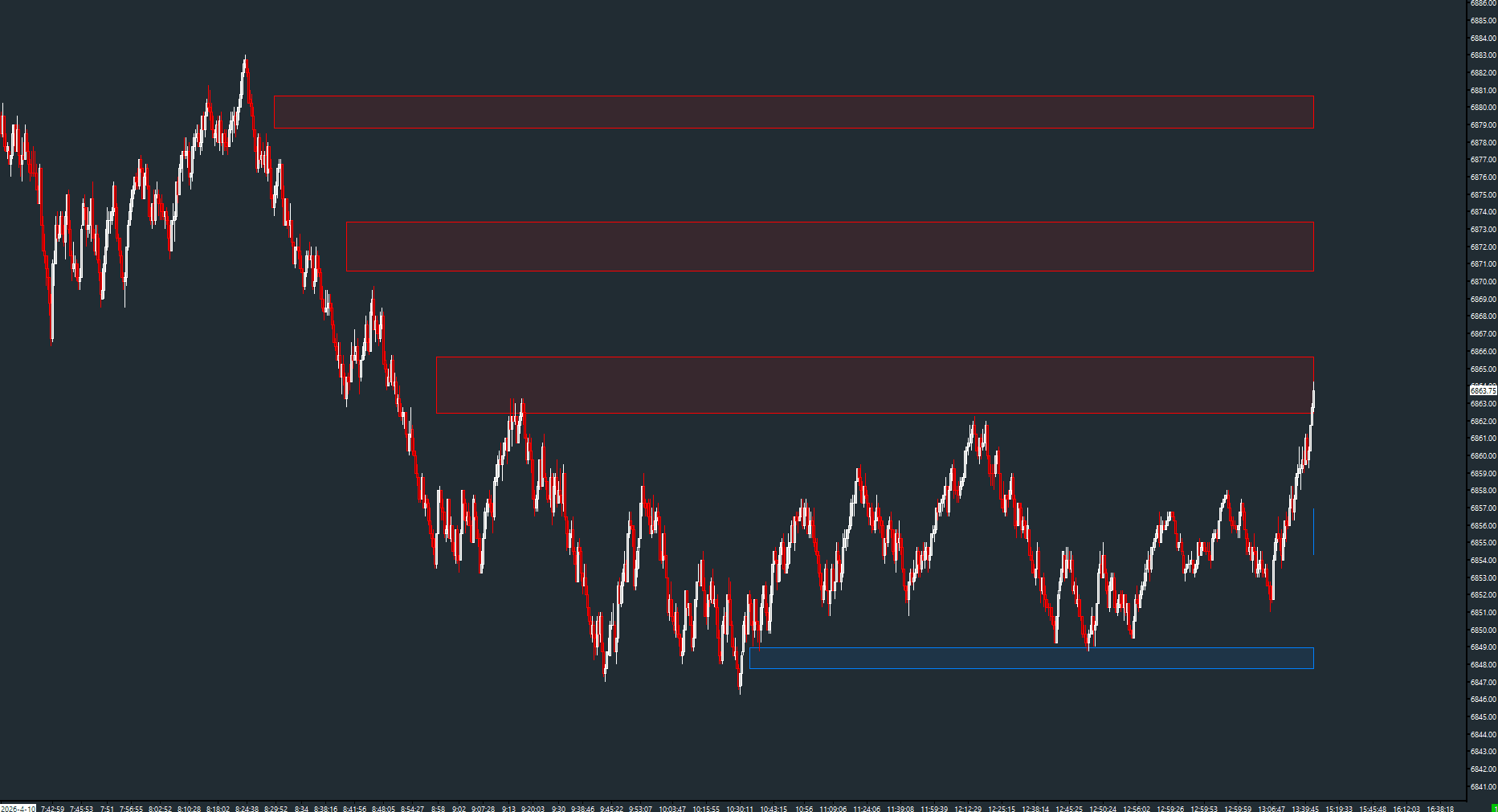
Draws retracement-based support and resistance zones from swing points. Zones represent the locations where price is most likely to react — the retracement levels of the prior impulsive move. Features configurable percentage levels, automatic invalidation, expiration, and overlap management.
The Concept
After an impulsive move, price tends to retrace a portion of that move before continuing. Reaction Zones identifies these retracement areas by computing configurable percentage levels from each swing leg. These zones represent high-probability reaction points — where patient traders wait for price to come to them rather than chasing.
How to Read It
Buy zones (blue) and sell zones (red) are drawn as shaded rectangles on the chart.
- Buy zones appear below price after a swing low — areas where longs are likely to trigger
- Sell zones appear above price after a swing high — areas where shorts are likely to trigger
- Zones are automatically invalidated when price trades through them completely
- Tighter percentage levels (closer to the swing point) represent stronger reaction areas
Practical Tips
Use ATR-Based rotation mode to adapt zone generation to current volatility. The Min Range filter prevents zones from being drawn on insignificant swings. Enable zone expiration to automatically remove stale zones after N bars. The overlap mode controls how overlapping zones are handled — helpful for keeping the chart readable.
Input & Settings
| No. | Input Name | Function |
|---|---|---|
| 1 | Rotation Mode | How the swing reversal amount is determined. Manual = fixed value. ATR-Based = derived from ATR. Default: ATR-Based. |
| 2 | Rotation | Fixed reversal amount in points when using Manual mode. Default: varies by instrument. |
| 3 | ATR Period | ATR lookback period when using ATR-Based mode. Default: 14. |
| 4 | ATR Multiplier | Multiplier applied to ATR for the reversal threshold. Default: 1.5. |
| 5 | Sell Zone 1 (%) | First retracement percentage for sell zones. Default: 50. |
| 6 | Sell Zone 2 (%) | Second retracement percentage for sell zones. Default: 61.8. |
| 7 | Buy Zone 1 (%) | First retracement percentage for buy zones. Default: 50. |
| 8 | Buy Zone 2 (%) | Second retracement percentage for buy zones. Default: 61.8. |
| 9 | Max Visible Zones | Maximum number of active zones displayed simultaneously. Default: 10. |
| 10 | Enable Expiry | When enabled, zones expire after a configurable number of bars. Default: No. |
| 11 | Expiry Bars | Number of bars before a zone expires (when expiry is enabled). Default: 200. |
How the swing reversal amount is determined. Manual = fixed value. ATR-Based = derived from ATR. Default: ATR-Based.
Fixed reversal amount in points when using Manual mode. Default: varies by instrument.
ATR lookback period when using ATR-Based mode. Default: 14.
Multiplier applied to ATR for the reversal threshold. Default: 1.5.
First retracement percentage for sell zones. Default: 50.
Second retracement percentage for sell zones. Default: 61.8.
First retracement percentage for buy zones. Default: 50.
Second retracement percentage for buy zones. Default: 61.8.
Maximum number of active zones displayed simultaneously. Default: 10.
When enabled, zones expire after a configurable number of bars. Default: No.
Number of bars before a zone expires (when expiry is enabled). Default: 200.
Subgraphs
| No. | Subgraph Name | Function & Comments |
|---|---|---|
| 1 | Rotation | Default: Ignore. Internal swing computation. Zones are rendered as chart drawings. |
Default: Ignore. Internal swing computation. Zones are rendered as chart drawings.
Free with the AMT Toolkit
This study is part of the AMT Toolkit — a free collection of Sierra Chart studies for orderflow, market structure, and chart utilities. 100% free, with no AMT Gold membership or credit card required.
Sierra Chart and applicable market-data fees are separate.
Get the AMT Toolkit — Free