
AMT Session Tracker
Running session high, low, and midpoint for configurable sessions
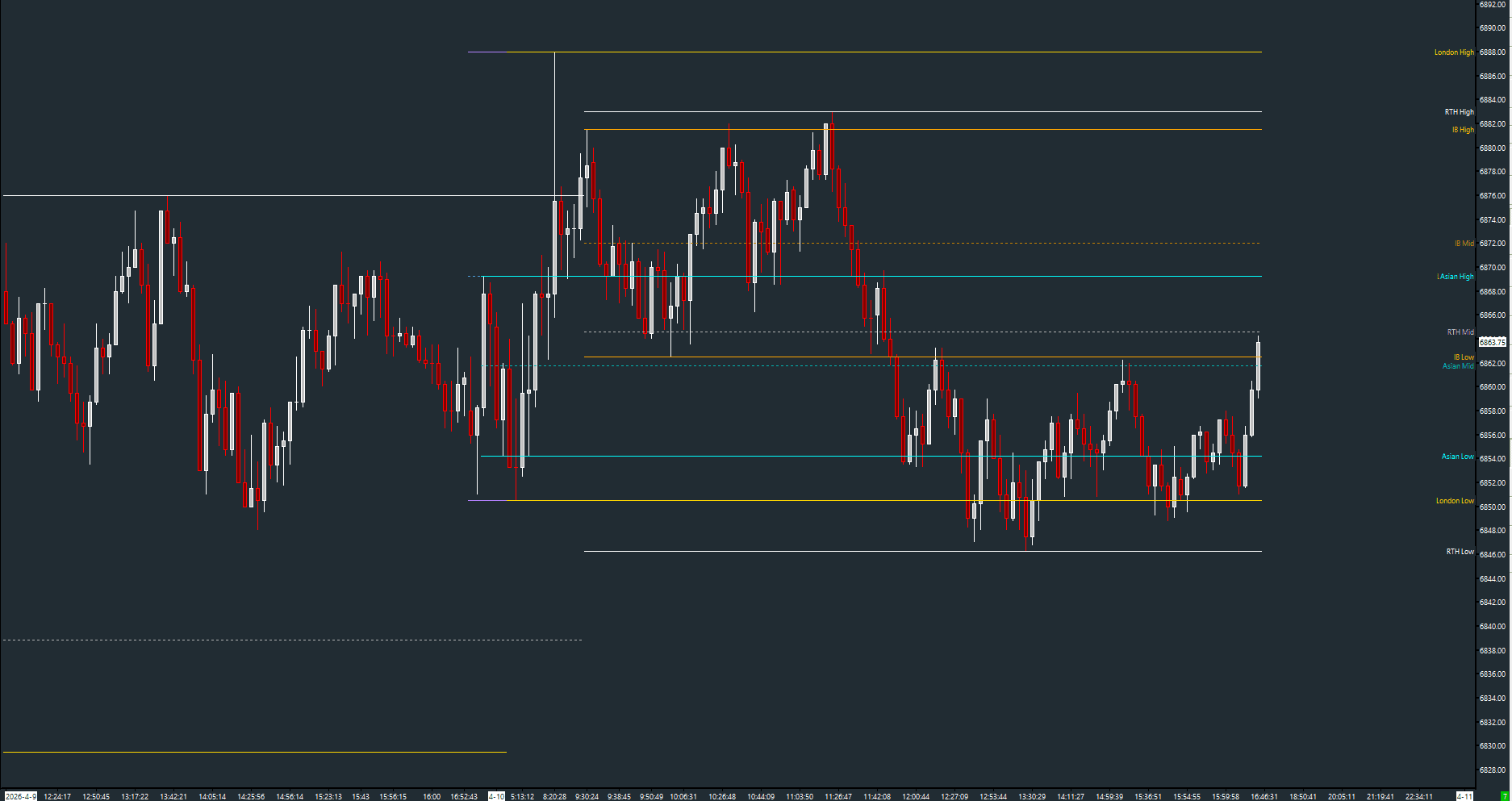
Tracks and displays the running high, low, and midpoint for five independently configurable trading sessions: US RTH, Overnight, London, Asian, and Initial Balance. All levels are drawn as dashed lines with color-coded identification.
The Concept
Different trading sessions develop their own ranges. The US RTH session defines the domestic range, London defines the European range, and the Overnight session captures globex activity. The high and low of each session act as natural support and resistance levels. Session Tracker automatically computes these levels in real-time so you can see where each session's boundaries are developing.
How to Read It
Each session shows three levels: High, Low, and Mid.
- Session High/Low define the range for that session — breakouts signal range extension
- Session Mid is the midpoint of the range — price above mid leans bullish for that session, below leans bearish
- Initial Balance (first hour) is especially important — IB range extension is a key AMT concept
- Overnight High/Low are frequently tested during the US open
Practical Tips
All session times are fully configurable — adjust them to match your exchange and timezone. The default times are set for US Eastern CME futures. Enable only the sessions you actively reference to keep the chart clean. Each session uses a distinct color: white for US RTH, purple for Overnight, gold for London, cyan for Asian, orange for Initial Balance.
Input & Settings
| No. | Input Name | Function |
|---|---|---|
| 1 | Enable US Session | Enables tracking of the US RTH session. Default: Yes. |
| 2 | US Session Start | Start time for the US session. Default: 06:30. |
| 3 | US Session End | End time for the US session. Default: 13:59. |
| 4 | Enable Overnight Session | Enables tracking of the Overnight session. Default: Yes. |
| 5 | Overnight Session Start | Start time for the Overnight session. Default: 15:00. |
| 6 | Overnight Session End | End time for the Overnight session. Default: 06:29. |
| 7 | Enable London Session | Enables tracking of the London session. Default: Yes. |
| 8 | London Session Start | Start time for the London session. Default: 00:00. |
| 9 | London Session End | End time for the London session. Default: 08:29. |
| 10 | Enable Asian Session | Enables tracking of the Asian session. Default: Yes. |
| 11 | Asian Session Start | Start time for the Asian session. Default: 16:00. |
| 12 | Asian Session End | End time for the Asian session. Default: 22:59. |
| 13 | Enable Initial Balance | Enables tracking of the Initial Balance period. Default: Yes. |
| 14 | Initial Balance Start | Start time for the Initial Balance. Default: 06:30. |
| 15 | Initial Balance End | End time for the Initial Balance. Default: 07:29. |
Enables tracking of the US RTH session. Default: Yes.
Start time for the US session. Default: 06:30.
End time for the US session. Default: 13:59.
Enables tracking of the Overnight session. Default: Yes.
Start time for the Overnight session. Default: 15:00.
End time for the Overnight session. Default: 06:29.
Enables tracking of the London session. Default: Yes.
Start time for the London session. Default: 00:00.
End time for the London session. Default: 08:29.
Enables tracking of the Asian session. Default: Yes.
Start time for the Asian session. Default: 16:00.
End time for the Asian session. Default: 22:59.
Enables tracking of the Initial Balance period. Default: Yes.
Start time for the Initial Balance. Default: 06:30.
End time for the Initial Balance. Default: 07:29.
Subgraphs
| No. | Subgraph Name | Function & Comments |
|---|---|---|
| 1 | RTH High | Default: Dash. The high of the US RTH session, displayed in white. |
| 2 | RTH Low | Default: Dash. The low of the US RTH session, displayed in white. |
| 3 | RTH Mid | Default: Dash (dotted). The midpoint of the US RTH session range. |
| 4 | ON High | Default: Dash. The high of the Overnight session, displayed in purple. |
| 5 | ON Low | Default: Dash. The low of the Overnight session, displayed in purple. |
| 6 | ON Mid | Default: Dash (dotted). The midpoint of the Overnight session range. |
| 7 | London High | Default: Dash. The high of the London session, displayed in gold. |
| 8 | London Low | Default: Dash. The low of the London session, displayed in gold. |
| 9 | London Mid | Default: Dash (dotted). The midpoint of the London session range. |
| 10 | Asian High | Default: Dash. The high of the Asian session, displayed in cyan. |
| 11 | Asian Low | Default: Dash. The low of the Asian session, displayed in cyan. |
| 12 | Asian Mid | Default: Dash (dotted). The midpoint of the Asian session range. |
| 13 | IB High | Default: Dash. The high of the Initial Balance period, displayed in orange. |
| 14 | IB Low | Default: Dash. The low of the Initial Balance period, displayed in orange. |
| 15 | IB Mid | Default: Dash (dotted). The midpoint of the Initial Balance range. |
Default: Dash. The high of the US RTH session, displayed in white.
Default: Dash. The low of the US RTH session, displayed in white.
Default: Dash (dotted). The midpoint of the US RTH session range.
Default: Dash. The high of the Overnight session, displayed in purple.
Default: Dash. The low of the Overnight session, displayed in purple.
Default: Dash (dotted). The midpoint of the Overnight session range.
Default: Dash. The high of the London session, displayed in gold.
Default: Dash. The low of the London session, displayed in gold.
Default: Dash (dotted). The midpoint of the London session range.
Default: Dash. The high of the Asian session, displayed in cyan.
Default: Dash. The low of the Asian session, displayed in cyan.
Default: Dash (dotted). The midpoint of the Asian session range.
Default: Dash. The high of the Initial Balance period, displayed in orange.
Default: Dash. The low of the Initial Balance period, displayed in orange.
Default: Dash (dotted). The midpoint of the Initial Balance range.
Free with the AMT Toolkit
This study is part of the AMT Toolkit — a free collection of Sierra Chart studies for orderflow, market structure, and chart utilities. 100% free, with no AMT Gold membership or credit card required.
Sierra Chart and applicable market-data fees are separate.
Get the AMT Toolkit — Free