
AMT Balance research
Zone Expectation: opening context, reach, and reaction.
Where did the previous session close, and where did this one open? The Zone Expectation Dashboard groups historical sessions by that pair of locations, then compares which zones price reached and where the session extremes formed.
1. Match the location
Five references—S4, S1, Balance, R1, and R4—divide the map into six zones. CL means prior close zone; OP means current open zone. Match both, along with the market.
2. Read reach separately
Reach measures whether a zone was visited in the matching historical sample. A high reach rate does not tell you the path price took before arriving.
3. Inspect the response
The dashboard’s resistance and support measures describe where the session high and low fell, conditional on reaching a zone. They are different from a trade win rate or a measured reversal after a touch.
Read a saved chart example
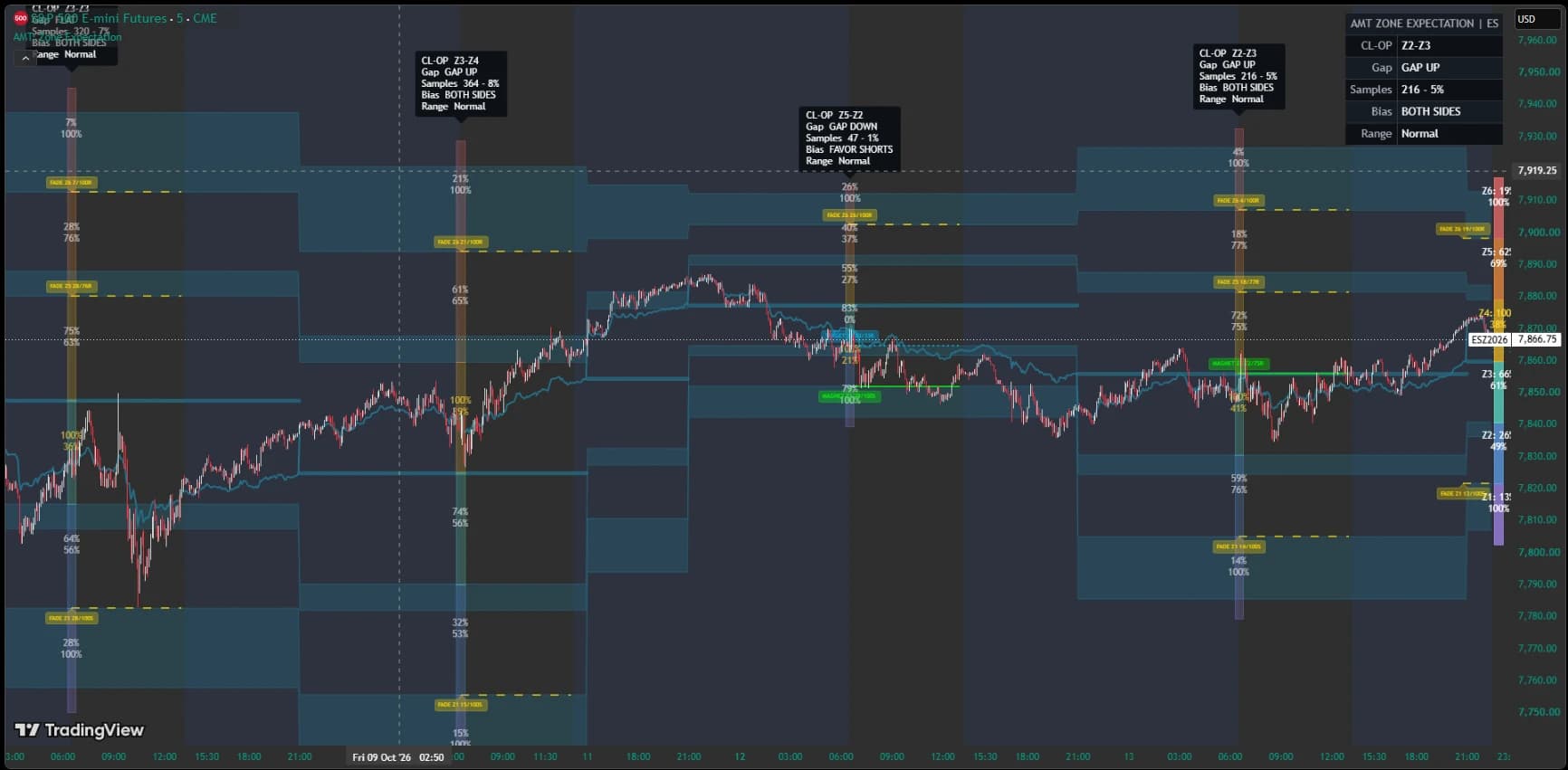
This TradingView screenshot illustrates the zone vocabulary on a historical ES chart. It is not a live dashboard or evidence that every displayed summary was available at the opening print. Read the indicator guide for session timing and access details.
A FIRST READ
Read the opening context
The session summary brings together the prior close zone, opening zone, sample count, and bias. The middle session in this ES example is labeled FAVOR SHORTS; other sessions show BOTH SIDES. The bias adds context, not an instruction to enter a trade.
Historical summaries are drawn back at the opening bar. Their position alone does not show when they appeared live.
How to interpret the historical sample
- Select a market and check its displayed date range and session count. Coverage differs by market.
- Select the prior-close/current-open combination in the six-by-six matrix. Its count is the relevant sample, rather than every session in the dataset.
- Compare each zone’s reach rate with its resistance or support measure. Those percentages answer different questions and can use different denominators.
- Review the separate backtest assumptions and walk-forward results before interpreting any modeled setup. Entry timing, exits, costs, and information available at the time matter.
For example, closing in Z2 and opening in Z3 defines one historical group. It does not mean the next session must travel to Z4. Smaller groups provide less evidence, and an extreme outer zone can contain the session high or low simply because there is no further zone beyond it. A 100% outer-zone statistic is not a guarantee of rejection.
The map helps organize observations. Bias labels summarize the model’s historical classification; they do not establish a profitable trading strategy. Compare with opening-type research or Initial Balance research, each of which has its own definitions.
The explanation and example above are public. The interactive dashboard below requires an active AMT Balance license. Explore AMT Balance or browse the public research.
Member dashboard
Explore historical reach and reaction across AMT Balance zones. An active AMT Balance license is required to access the dashboard.